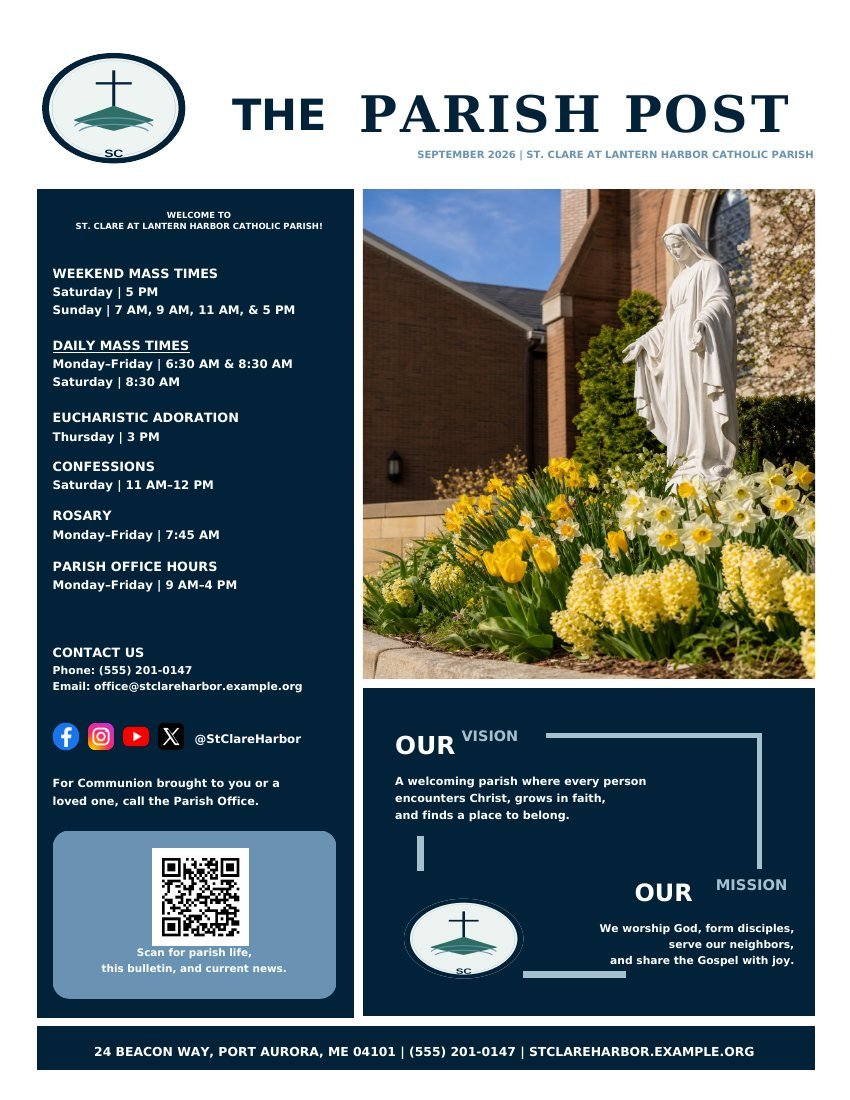
Free Online Church Bulletin Maker for Print and Mobile
Start with a cover and the sections your church actually uses. The full editor opens in the browser, saves the draft, produces a clean print PDF, and can publish the same reviewed issue as a phone-friendly page.
Choose a template when the church is starting fresh, or import a recent PDF or website when the current bulletin already has useful structure. Review the imported result page by page before treating it as the new reusable starting point.
Start from a church-news, worship-guide or combined structure
Add heading, body, image, shape, QR code or link elements
Import a recent PDF, photo or public church website
Duplicate an approved issue for next week
Finish both outputs from one approved issue
The print PDF and live mobile bulletin use the same reviewed content. The print version preserves page design and booklet settings; the mobile version turns actions into tappable links and avoids pinch-to-zoom reading.
Clean PDF export
Letter, half-letter, A4 and A5 sizes
Regular pages or imposed booklet output
Shareable mobile link and QR code
Email, lobby-screen and social derivatives
Straight answers
Frequently asked questions
Is the online church bulletin maker really free?
Yes. Creation, clean PDF export, collaboration, public mobile publishing and the recurring weekly workflow are available without a payment card.
Can I add an extra section?
Yes. Add a section with a heading, body text, optional image, link and action. You can also add blank pages and place text, pictures, shapes and QR codes directly.
Can I import our current bulletin?
Yes. Upload a recent PDF or photo, or use the public church website as a reviewable starting source. Imported material remains editable after review.
Use the complete workflow
Create, review, print and publish the next issue for free.
No payment card, no watermark and no paywall at export.